%20--%3E%3Cmetadata%20xmlns%3Ardf%3D%22http%3A%2F%2Fwww.w3.org%2F1999%2F02%2F22-rdf-syntax-ns%23%22%20xmlns%3Axsi%3D%22http%3A%2F%2Fwww.w3.org%2F2001%2FXMLSchema-instance%22%20xmlns%3Adc%3D%22http%3A%2F%2Fpurl.org%2Fdc%2Felements%2F1.1%2F%22%20xmlns%3Adcterms%3D%22http%3A%2F%2Fpurl.org%2Fdc%2Fterms%2F%22%3E%3Crdf%3ARDF%3E%3Crdf%3ADescription%3E%3Cdc%3Atitle%3EWaves%3C%2Fdc%3Atitle%3E%3Cdc%3Acreator%3EDiceBear%3C%2Fdc%3Acreator%3E%3Cdc%3Asource%20xsi%3Atype%3D%22dcterms%3AURI%22%3Ehttps%3A%2F%2Fwww.dicebear.com%3C%2Fdc%3Asource%3E%3Cdcterms%3Alicense%20xsi%3Atype%3D%22dcterms%3AURI%22%3Ehttps%3A%2F%2Fcreativecommons.org%2Fpublicdomain%2Fzero%2F1.0%2F%3C%2Fdcterms%3Alicense%3E%3Cdc%3Arights%3E%E2%80%9CWaves%E2%80%9D%20(https%3A%2F%2Fwww.dicebear.com)%20by%20%E2%80%9CDiceBear%E2%80%9D%2C%20licensed%20under%20%E2%80%9CCC0%201.0%E2%80%9D%20(https%3A%2F%2Fcreativecommons.org%2Fpublicdomain%2Fzero%2F1.0%2F)%3C%2Fdc%3Arights%3E%3C%2Frdf%3ADescription%3E%3C%2Frdf%3ARDF%3E%3C%2Fmetadata%3E%3Cdefs%3E%3Cg%20id%3D%22layer-calm-e2f1c7e5%22%3E%3Cpath%20d%3D%22M0%2016c28%200%2052-6%2084-5s72%2010%20116%205v114H0Z%22%20fill%3D%22%23ffffff%22%2F%3E%3C%2Fg%3E%3Cg%20id%3D%22layer-surge-e2f1c7e5%22%3E%3Cpath%20d%3D%22M0%206c24%200%2044%204%2062%2014%2016%208%2034%208%2052%202%2020-7%2038-12%2054-12%2012%200%2024%204%2032%206v114H0Z%22%20fill%3D%22%23ffffff%22%2F%3E%3C%2Fg%3E%3Cg%20id%3D%22layer-rolling-e2f1c7e5%22%3E%3Cpath%20d%3D%22M0%208c12%200%2023%2016%2035%2016S58%208%2070%208s23%2016%2035%2016%2023-16%2035-16%2023%2016%2035%2016c8%200%2017-8%2025-10v116H0Z%22%20fill%3D%22%23ffffff%22%2F%3E%3C%2Fg%3E%3Cg%20id%3D%22layer-ripple-e2f1c7e5%22%3E%3Cpath%20d%3D%22M0%2012c6%200%2012%2010%2018%2010s12-10%2018-10%2012%2010%2018%2010%2012-10%2018-10%2012%2010%2018%2010%2012-10%2018-10%2012%2010%2018%2010%2012-10%2018-10%2012%2010%2018%2010%2012-10%2018-10%2012%206%2020%205v113H0Z%22%20fill%3D%22%23ffffff%22%2F%3E%3C%2Fg%3E%3Cg%20id%3D%22body-quartet-e2f1c7e5%22%3E%3Cg%20opacity%3D%22.16%22%3E%3Cg%20class%3D%22dbwa-l1%22%3E%3Cuse%20transform%3D%22translate(-50)%20translate(-4.2834%2C%200.40469)%22%20href%3D%22%23layer-calm-e2f1c7e5%22%2F%3E%3C%2Fg%3E%3C%2Fg%3E%3Cg%20opacity%3D%22.28%22%3E%3Cg%20class%3D%22dbwa-l2%22%3E%3Cuse%20transform%3D%22translate(-50%2022)%20translate(-0.6726%2C%20-1.76904)%22%20href%3D%22%23layer-surge-e2f1c7e5%22%2F%3E%3C%2Fg%3E%3C%2Fg%3E%3Cg%20opacity%3D%22.4%22%3E%3Cg%20class%3D%22dbwa-l3%22%3E%3Cuse%20transform%3D%22translate(-50%2044)%20translate(21.385%2C%202.13317)%22%20href%3D%22%23layer-rolling-e2f1c7e5%22%2F%3E%3C%2Fg%3E%3C%2Fg%3E%3Cg%20opacity%3D%22.52%22%3E%3Cg%20class%3D%22dbwa-l4%22%3E%3Cuse%20transform%3D%22translate(-50%2066)%20translate(-1.8808%2C%20-2.98493)%22%20href%3D%22%23layer-ripple-e2f1c7e5%22%2F%3E%3C%2Fg%3E%3C%2Fg%3E%3C%2Fg%3E%3Cg%20id%3D%22bodyFree-default-e2f1c7e5%22%3E%3Cuse%20href%3D%22%23body-quartet-e2f1c7e5%22%2F%3E%3C%2Fg%3E%3Cg%20id%3D%22rotation-free-e2f1c7e5%22%3E%3Cuse%20transform%3D%22rotate(131.0243%2C%2050%2C%2050)%22%20href%3D%22%23bodyFree-default-e2f1c7e5%22%2F%3E%3C%2Fg%3E%3Cg%20id%3D%22animation-none-e2f1c7e5%22%3E%3C%2Fg%3E%3CclipPath%20id%3D%22clip-e2f1c7e5%22%3E%3Crect%20width%3D%22100%22%20height%3D%22100%22%20rx%3D%220%22%20ry%3D%220%22%2F%3E%3C%2FclipPath%3E%3C%2Fdefs%3E%3Cg%20clip-path%3D%22url(%23clip-e2f1c7e5)%22%3E%3Crect%20width%3D%22100%22%20height%3D%22100%22%20fill%3D%22%23a21caf%22%2F%3E%3Cuse%20href%3D%22%23rotation-free-e2f1c7e5%22%2F%3E%3Cuse%20href%3D%22%23animation-none-e2f1c7e5%22%2F%3E%3C%2Fg%3E%3C%2Fsvg%3E)
Email Etiquettes
- Shivam covered email etiquettes, which was a very good idea
- After some basics like CC, BCC, he made them write emails for practical things like postponing a standup (😂) etc.
Emails: How do they work?
Lecture by: Hussain, Duration: 2.5hrs
Depends on the internet lecture, quick recap if needed.
By the end, they should be able to understand:
- shanti@cs17.org => shanti (mailbox), cs17.org (domain)
- Sender mail server first does MX (mail exchange) record query to DNS, gets back hostname (e.g. bwh.frappemail.com in our case)
- Then hostname is used to get IP Address (again DNS call, A/AAAA), e.g. 192.12.45.65
- Sender sends to the IP (using SMTP)
- Receiver mail server uses the "shanti" part to put the message in the right mailbox.
Base material:
Practical Demo:
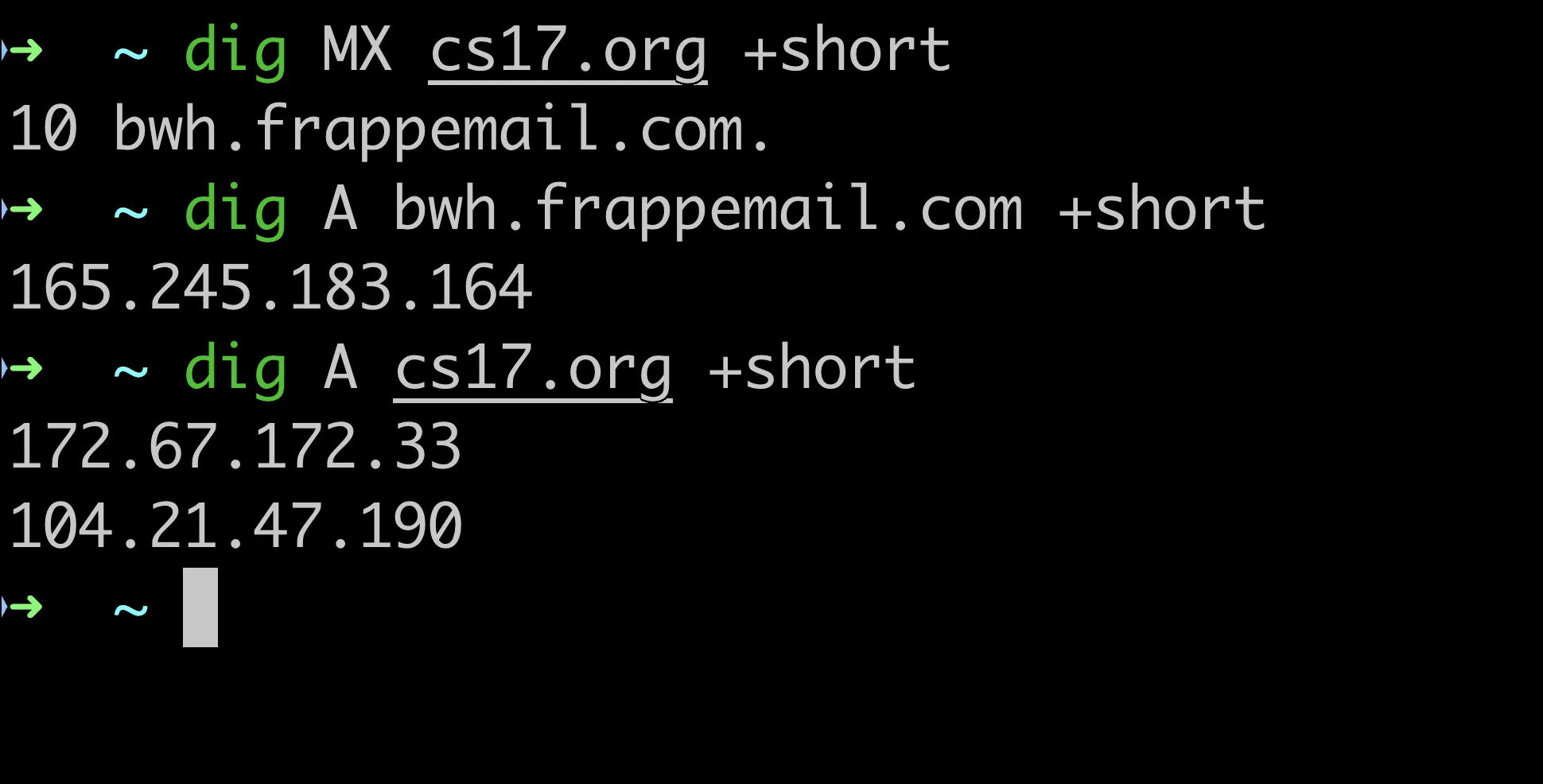
Useful diagram to explain mailboxes:
Mail Server
│
├── mailbox: ali@cs17.org
├── mailbox: sara@cs17.org
├── mailbox: hussain@cs17.org
└── mailbox: teacher@cs17.org
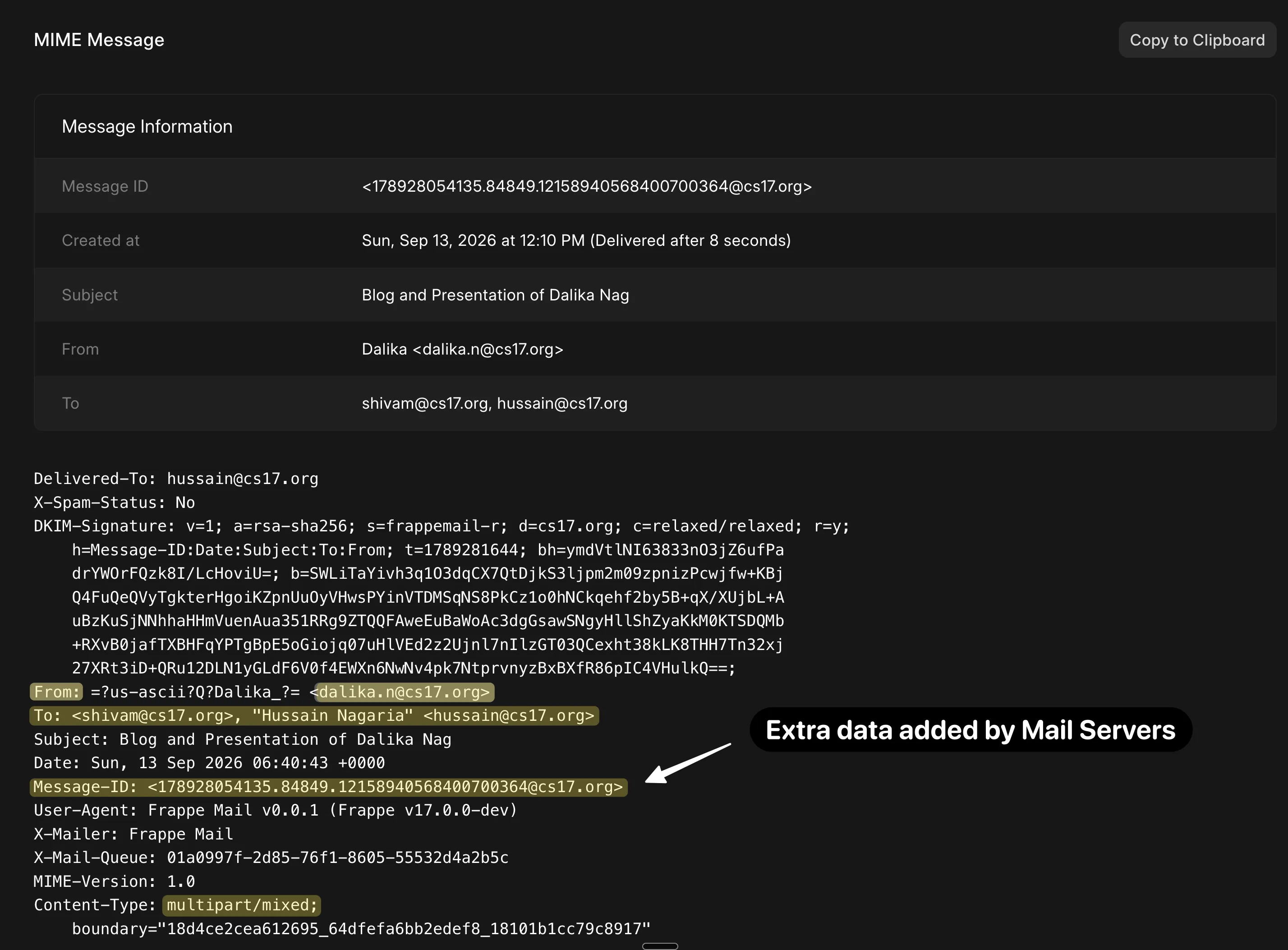
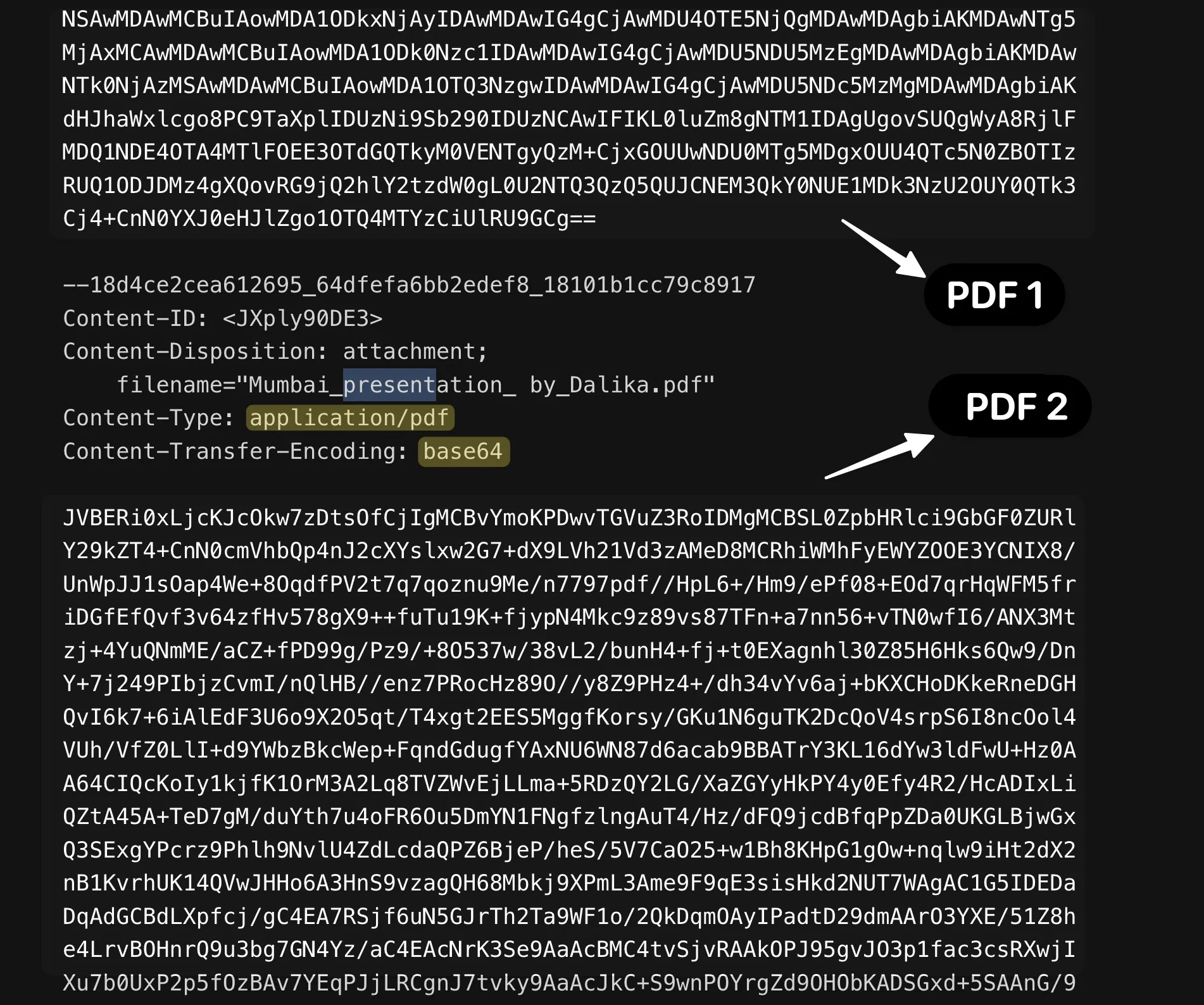
Some notes:
- base64 to binary conversion happens on either side (they know this by now): this is what the MIME standard allows, embedding non-text content in emails.
Full forms:
- MIME: Multipurpose Internet Mail Extensions
- This was explained by first showing the original / MIME message (an email containing two PDF attachments)
- SMTP: Simple Mail Transfer Protocol
- POP3: Post Office Protocol Version 3
- IMAP: Internet Message Access Protocol
Ports
Explain when the same server has web server and email server, hence same IP address. But door analogy on how different protocols wait on different doors.
Not covered yet:
- Network layers, TCP etc. and security records like DMARC, etc.
Last updated 2 weeks ago