%20--%3E%3Cmetadata%20xmlns%3Ardf%3D%22http%3A%2F%2Fwww.w3.org%2F1999%2F02%2F22-rdf-syntax-ns%23%22%20xmlns%3Axsi%3D%22http%3A%2F%2Fwww.w3.org%2F2001%2FXMLSchema-instance%22%20xmlns%3Adc%3D%22http%3A%2F%2Fpurl.org%2Fdc%2Felements%2F1.1%2F%22%20xmlns%3Adcterms%3D%22http%3A%2F%2Fpurl.org%2Fdc%2Fterms%2F%22%3E%3Crdf%3ARDF%3E%3Crdf%3ADescription%3E%3Cdc%3Atitle%3EWaves%3C%2Fdc%3Atitle%3E%3Cdc%3Acreator%3EDiceBear%3C%2Fdc%3Acreator%3E%3Cdc%3Asource%20xsi%3Atype%3D%22dcterms%3AURI%22%3Ehttps%3A%2F%2Fwww.dicebear.com%3C%2Fdc%3Asource%3E%3Cdcterms%3Alicense%20xsi%3Atype%3D%22dcterms%3AURI%22%3Ehttps%3A%2F%2Fcreativecommons.org%2Fpublicdomain%2Fzero%2F1.0%2F%3C%2Fdcterms%3Alicense%3E%3Cdc%3Arights%3E%E2%80%9CWaves%E2%80%9D%20(https%3A%2F%2Fwww.dicebear.com)%20by%20%E2%80%9CDiceBear%E2%80%9D%2C%20licensed%20under%20%E2%80%9CCC0%201.0%E2%80%9D%20(https%3A%2F%2Fcreativecommons.org%2Fpublicdomain%2Fzero%2F1.0%2F)%3C%2Fdc%3Arights%3E%3C%2Frdf%3ADescription%3E%3C%2Frdf%3ARDF%3E%3C%2Fmetadata%3E%3Cdefs%3E%3Cg%20id%3D%22layer-calm-e2f1c7e5%22%3E%3Cpath%20d%3D%22M0%2016c28%200%2052-6%2084-5s72%2010%20116%205v114H0Z%22%20fill%3D%22%23ffffff%22%2F%3E%3C%2Fg%3E%3Cg%20id%3D%22layer-surge-e2f1c7e5%22%3E%3Cpath%20d%3D%22M0%206c24%200%2044%204%2062%2014%2016%208%2034%208%2052%202%2020-7%2038-12%2054-12%2012%200%2024%204%2032%206v114H0Z%22%20fill%3D%22%23ffffff%22%2F%3E%3C%2Fg%3E%3Cg%20id%3D%22layer-rolling-e2f1c7e5%22%3E%3Cpath%20d%3D%22M0%208c12%200%2023%2016%2035%2016S58%208%2070%208s23%2016%2035%2016%2023-16%2035-16%2023%2016%2035%2016c8%200%2017-8%2025-10v116H0Z%22%20fill%3D%22%23ffffff%22%2F%3E%3C%2Fg%3E%3Cg%20id%3D%22layer-ripple-e2f1c7e5%22%3E%3Cpath%20d%3D%22M0%2012c6%200%2012%2010%2018%2010s12-10%2018-10%2012%2010%2018%2010%2012-10%2018-10%2012%2010%2018%2010%2012-10%2018-10%2012%2010%2018%2010%2012-10%2018-10%2012%2010%2018%2010%2012-10%2018-10%2012%206%2020%205v113H0Z%22%20fill%3D%22%23ffffff%22%2F%3E%3C%2Fg%3E%3Cg%20id%3D%22body-quartet-e2f1c7e5%22%3E%3Cg%20opacity%3D%22.16%22%3E%3Cg%20class%3D%22dbwa-l1%22%3E%3Cuse%20transform%3D%22translate(-50)%20translate(-4.2834%2C%200.40469)%22%20href%3D%22%23layer-calm-e2f1c7e5%22%2F%3E%3C%2Fg%3E%3C%2Fg%3E%3Cg%20opacity%3D%22.28%22%3E%3Cg%20class%3D%22dbwa-l2%22%3E%3Cuse%20transform%3D%22translate(-50%2022)%20translate(-0.6726%2C%20-1.76904)%22%20href%3D%22%23layer-surge-e2f1c7e5%22%2F%3E%3C%2Fg%3E%3C%2Fg%3E%3Cg%20opacity%3D%22.4%22%3E%3Cg%20class%3D%22dbwa-l3%22%3E%3Cuse%20transform%3D%22translate(-50%2044)%20translate(21.385%2C%202.13317)%22%20href%3D%22%23layer-rolling-e2f1c7e5%22%2F%3E%3C%2Fg%3E%3C%2Fg%3E%3Cg%20opacity%3D%22.52%22%3E%3Cg%20class%3D%22dbwa-l4%22%3E%3Cuse%20transform%3D%22translate(-50%2066)%20translate(-1.8808%2C%20-2.98493)%22%20href%3D%22%23layer-ripple-e2f1c7e5%22%2F%3E%3C%2Fg%3E%3C%2Fg%3E%3C%2Fg%3E%3Cg%20id%3D%22bodyFree-default-e2f1c7e5%22%3E%3Cuse%20href%3D%22%23body-quartet-e2f1c7e5%22%2F%3E%3C%2Fg%3E%3Cg%20id%3D%22rotation-free-e2f1c7e5%22%3E%3Cuse%20transform%3D%22rotate(131.0243%2C%2050%2C%2050)%22%20href%3D%22%23bodyFree-default-e2f1c7e5%22%2F%3E%3C%2Fg%3E%3Cg%20id%3D%22animation-none-e2f1c7e5%22%3E%3C%2Fg%3E%3CclipPath%20id%3D%22clip-e2f1c7e5%22%3E%3Crect%20width%3D%22100%22%20height%3D%22100%22%20rx%3D%220%22%20ry%3D%220%22%2F%3E%3C%2FclipPath%3E%3C%2Fdefs%3E%3Cg%20clip-path%3D%22url(%23clip-e2f1c7e5)%22%3E%3Crect%20width%3D%22100%22%20height%3D%22100%22%20fill%3D%22%23a21caf%22%2F%3E%3Cuse%20href%3D%22%23rotation-free-e2f1c7e5%22%2F%3E%3Cuse%20href%3D%22%23animation-none-e2f1c7e5%22%2F%3E%3C%2Fg%3E%3C%2Fsvg%3E)
Lecture 1
Important bit here is to connect to scratch as much as possible. Hence, the slides in Lecture Resources are an important collateral. Some theory before live coding:
- Source Code
- Machine Code
- Compiler (
C) vs Interpreter (Python): don't bother much, anyways they won't understand, just briefly talk about it - Start with simple
print("hello, world")and compare toSayblock in Scratch (not on demo yet) - GUI vs CLI (what type of programs they are going to build, draw parallels with
lsetc. in terminal)
Live
Use the terminal
touch hello.py
cat hello.py # empty
echo "print('hello, world')" # just to remind this will just print
echo "print('hello, world')" >> hello.py
cat hello.py # only 1 line of source code

## run the source code
python hello.py # python3 in their Ubuntu based laptops
# hello, world
Break down the line:
print("hello, world") # f(x)
Explain function, argument, and why the shape of argument in Scratch is an oval (to resemble the braces in code). Also, explain side effects and output.
Then move on to use input to ask for name and print hello, name. Use this slide as a reference:
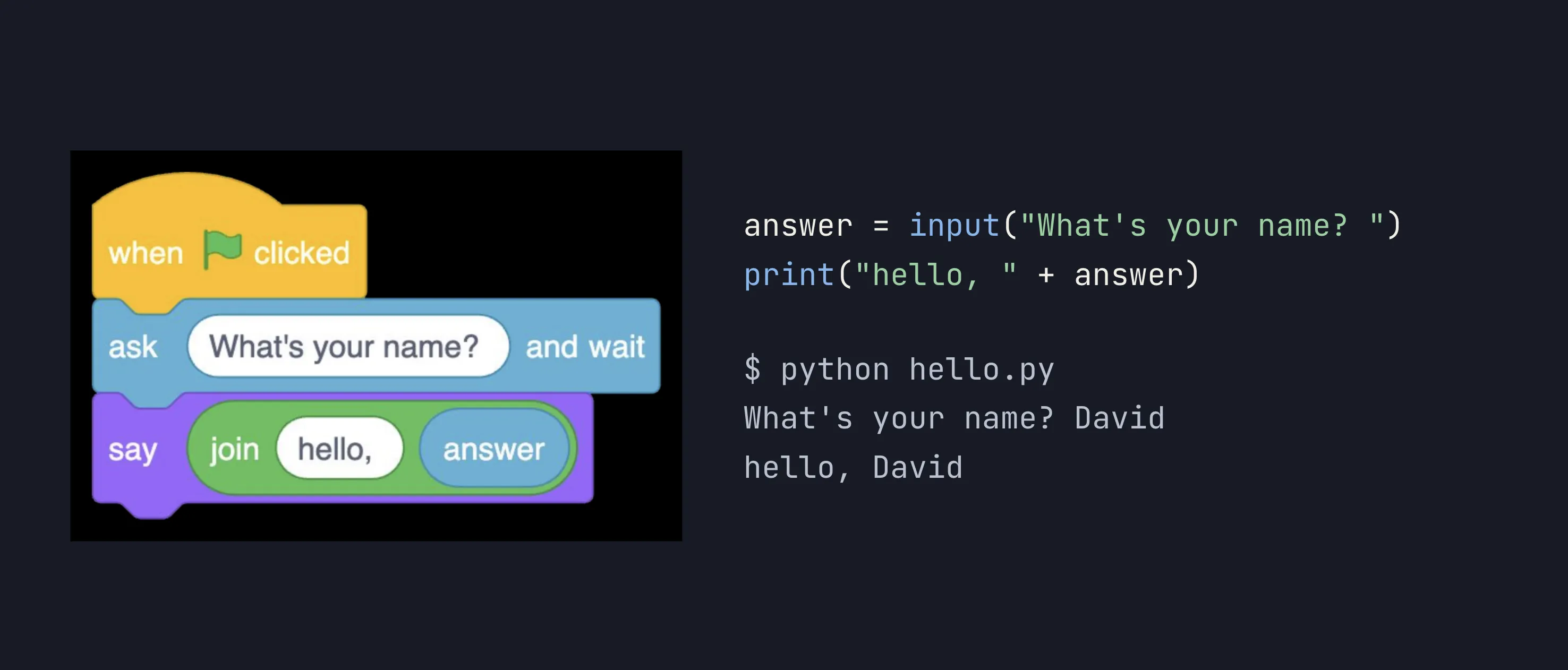
- Explain concatenation ("a" + "b" = "ab", but 1 + 2 = 3, i.e. python is smart) in brief.
- Explain variables (
answer).
Then take the below example, explain them line by line, then ask them to turn their laptops on!
name = input("What is your name?")
age = input("What is your age?")

print("Hello, " + name + "." + "You are " + age + " years old."
It is time for them to create a simple python file using terminal, open it using open and copy the exact content on the screen. Then save and run.
Ask them to make mistakes on purpose
So they get exposure to reading error messages
- Change
printtoPrint(name error)
REPL Session
Ask them to just run python3 without any filename. Ask them to run as asked:
2*22+72**55/25//2age = 2,age = age + 1,age(will print the age)age = input(...),age,age = age + 1[IMPORTANT]- Explain the difference (
18vs'18') and the error - Show using
intfunction
- Explain the difference (
exit
Naming Variables
Three rules they should have by heart for naming variables in python:
- Must not start with a number
- Must not contain any special character other than underscore
_ - Must not be a reserved keyword (e.g.
if)
Take a few valid and invalid examples in REPL and help them apply these rules.
Syntax Highlighting
Ubuntu text editor will already do this so, explain in brief. Open the file in VS Code and show syntax highlighting and other perks (red squiggly lines).
Homework
Write a python program:
- Ask for side of square, print area and perimeter
- Same for circle (float)
- Absolute value of a give number (hint to check python manual on student manual wiki)
- Ask for price and print discounted price if discount is 15%.
Share link and ask to install VS Code 😎
Lecture 2
Variables re-iterated with the box analogy. Python makes a box, applies a label (variable name), and puts the value in the box. What if the box doesn't exist and you ask python for it anyways? (NameError)
Data Types
- String
- Number: int, float
Operators
- Arithmetic operations:
+,-.*,/,//,** - Logical Operators (
and,or,not)- Introduce and Connect
booleandata type here
- Introduce and Connect
- Comparison operations:
<,>,>=,<=,==(explain why not=)!= - Assignment operators:
=,+=,-=, etc. (show with an example)
Help practice operators with output and trace table based questions, e.g.
a = 2
b = 5
b = a + b
a = b ** 2
print(a, b)
Homework
Lecture 3
Review the worksheets submitted and do all questions explaining them things they missed and how they should have approached the problems.
Ended with:
end,sepinprintwith examples. Gave them a worksheet with 100+ problems to sprint in a day or two: Worksheet 2